Custom Dashboard Widgets
Replace the WordPress admin dashboard with 9 React-powered widgets. Including an AI assistant and a built-in CLI terminal.
View on GitHubThe WordPress admin dashboard looks the same as it did years ago. CDW replaces it with something you'd actually want to open - configurable, React-powered widgets, per-user task management, a terminal, and an AI assistant wired to your site.
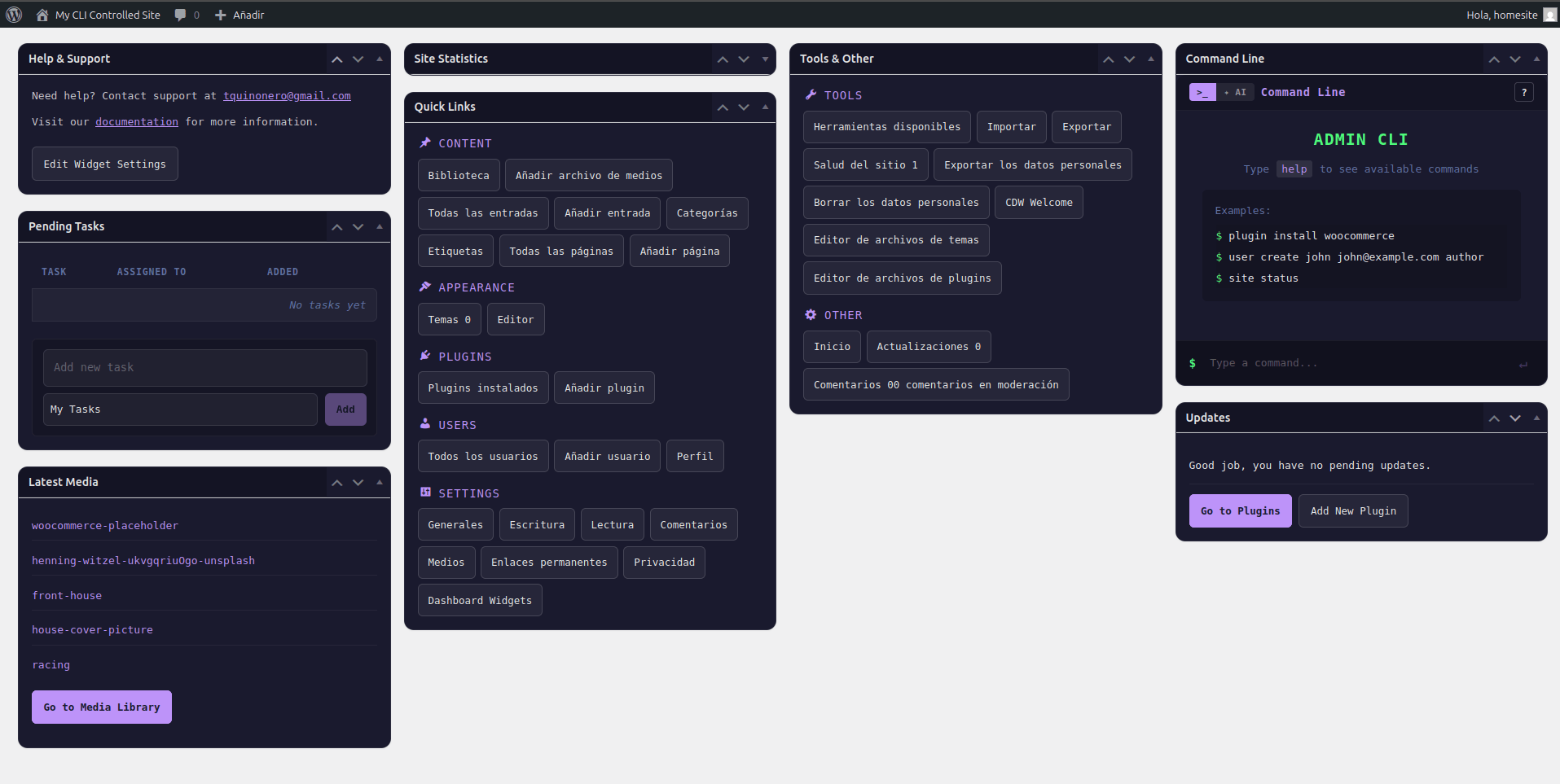
9 Widgets, Fully Configurable
Mix, match, and rearrange using the native WordPress drag-and-drop system. Each widget can be individually enabled or disabled from the settings page.
Help & Support
Custom support info for your clients
Display a support email and documentation link for your team or clients. Perfect for agencies handing off sites to clients.
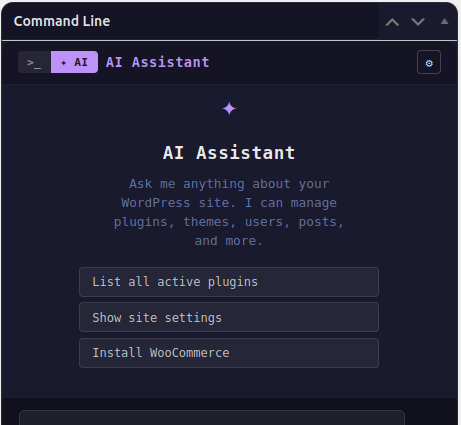
AI Assistant
Conversational site management (admin only)
Connect to OpenAI, Claude, Gemini, or any OpenAI-compatible endpoint. List plugins, create posts, flush caches - using natural language.
Command Line
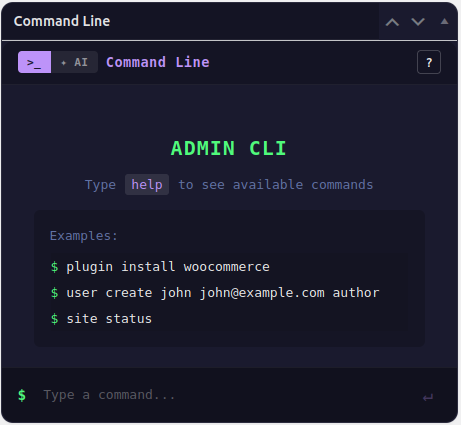
WP-CLI-like terminal (admin only)
A full terminal interface inside the WordPress admin. Powered by WordPress APIs, not a real shell - so it works on any host, no SSH required.
Quick Links
Fast admin navigation (admin only)
Configurable shortcuts to the WordPress admin pages you visit most. One click instead of hunting through the sidebar menu.
Pending Tasks
Per-user to-do list
A personal task list stored per user. Each team member has their own tasks, separate from everyone else's. Forget sticky notes on your monitor.
Updates
Plugin & theme updates (admin only)
See available plugin and theme updates without navigating away from the dashboard. Admin-only visibility keeps the clutter away from editors.
Latest Posts
Recent content at a glance
Your most recently published content, displayed clearly in the dashboard so you can quickly check what went live and jump back into editing.
Latest Media
Quick access to uploads
A preview of your most recently uploaded files - images, documents, anything in the media library - right on the dashboard.
Site Statistics
Post, page, user & media counts
At-a-glance counters for posts, pages, comments, users, and media. Everything you need to know about your site without leaving the dashboard.
Built for Real Work
Three headline features that make CDW more than a dashboard - it's a full site management layer.
A Terminal Inside Your WordPress Admin
The Command Line widget gives you a WP-CLI-like interface powered by WordPress APIs - not a real shell. That means it works on any host, including shared hosting with no SSH access. It covers plugin and theme management, user operations, post management, database optimization, transient flushing, search-replace (with --dry-run), maintenance mode, cron inspection, and more. Destructive operations require an explicit --force flag. Every command is logged to an audit table so you have a record of what ran and when.
$
plugin list --status=active
user create editor@example.com --role=editor
search-replace "http://" "https://" --dry-run
cache flush
maintenance-mode on
An AI That Can Actually Manage Your Site
The AI Assistant connects to your provider of choice - OpenAI, Anthropic (Claude), Google Gemini, or any OpenAI-compatible endpoint like OpenRouter or Groq - using your own API key. It uses an agentic loop with function-calling tools mapped to the same commands the CLI widget uses. So when you ask it to list plugins with updates or create a draft post, it's calling real commands - not guessing. Two modes: Confirm (review before it runs) and Auto (execute immediately for trusted tasks). Your API key is encrypted with AES-256-CBC before being saved, derived from your site's AUTH_SALT constants.
WordPress Abilities API - First-Class Integration
CDW v3 registers 70 admin tools as native WP_Ability objects in the cdw-admin-tools category - one of the first plugins to fully adopt the WordPress 6.9 Abilities API. All abilities are REST-exposed via the wp-abilities/v1 namespace with show_in_rest: true, and each one carries correct annotations: readonly for safe list/get/status operations, and destructive for anything that deletes. There's also an opt-in toggle to expose abilities via the WordPress MCP adapter plugin, making them discoverable to external AI clients. CDW isn't just a dashboard tool - it's an API for site management.
green = read-only · red = destructive
Built with Quality and Security in Mind
Every release goes through a full test suite - PHP unit tests with Brain\Monkey, JavaScript tests with Jest and Testing Library, and integration tests against a real WordPress database. PHPCS + PHPStan level 6, zero errors.
New Abilities
PHP unit tests
JS unit tests
Install in 3 Steps
No build step required. The compiled JS is shipped in the repository.
Download
Go to the GitHub repository and click Code → Download ZIP.
Upload
In WordPress go to Plugins → Add New → Upload Plugin, upload the ZIP, and activate.
Configure
All widget settings live under Settings → Dashboard Widgets once the plugin is active.
Or clone and build from source:
cd wp-content/plugins
git clone https://github.com/tquinonero/custom-dashboard-widgets CDW
cd CDW
composer install --no-dev